One of the most underrated digital skills is knowing how to organize files and folders properly.
It may sound basic, but it makes a huge difference. When your files are well organized, everything becomes easier. You find documents faster, avoid confusion, waste less time, and work with much more confidence. When they are not, even simple tasks start to feel more frustrating than they should.
Most people know the feeling. You save a file, close it, and a few days later you have no idea where it went. Then you search for it and find five versions with almost the same name. One says final, another says final-new, another says final-v2, and suddenly a very simple task becomes annoying.
The good news is that organizing files is not complicated. You do not need a perfect system. You just need a few clear habits.
What is a file?
A file is any piece of information saved on your computer. A photo is a file. A PDF is a file. A spreadsheet, a song, a video, and a text document are all files too.
The easiest way to think about a file is to imagine a sheet of paper with information on it. It has content, it has a name, and it needs to be stored somewhere.
Most files also have something called an extension. That is the part that appears after the dot in the file name, such as .docx, .pdf, .jpg, or .mp3. The extension helps the computer understand what kind of file it is and which program should open it.
Some common examples are:
.docxand.pdffor documents.xlsxfor spreadsheets.jpgand.pngfor images.mp4and.movfor videos.mp3and.wavfor audio.zipand.rarfor compressed files
You do not need to memorize every file type, but getting familiar with the common ones helps a lot.
And what is a folder?
A folder is simply a container that holds files.
If a file is like a paper document, then a folder is like the physical folder you would use to store related papers together. On a computer, the idea is exactly the same. Instead of leaving everything mixed in one place, you group related files so they are easier to find later.
Folders can also contain other folders. These are called subfolders. This is what allows you to create a structure that starts broad and becomes more specific as you go deeper.
For example, instead of saving everything in one big location, you might have a folder called Work, then inside it a folder called Reports, and inside that separate folders by year or project. That kind of structure already makes daily work much easier.
Good organization starts with good names
If there is one habit that changes everything, it is this: name your files clearly.
A bad file name tells you almost nothing. A good one tells you what the file is before you even open it.
Names like these usually create confusion:
document1.docxfinal.pdfuntitled(3).docxnew-final-v2.pdf
Names like these are much more useful:
2025-04-sales-report.docxclient-a-contract.pdfmeeting-notes-2025-04-20.docxinvoice-march-2025.pdf
A clear name should help you recognize the file immediately. In many cases, including the date also helps a lot. One of the best habits is to use the format year-month-day, because files automatically sort in the correct order when listed alphabetically.
Another useful habit is keeping names simple and consistent. Lowercase letters and hyphens often make file names easier to read and manage, especially when you start working across different systems and platforms.
Where you save files matters too
Most operating systems already give you standard folders such as Documents, Downloads, Pictures, and Desktop. These are helpful starting points, but many people fall into one very common habit: saving everything on the Desktop.
That usually works for a while, until the Desktop turns into a crowded storage area full of random screenshots, downloads, PDFs, shortcuts, and unfinished files.
A better way to think about it is this: the Desktop is like a real desk. It is a workspace, not a storage room. It is fine to keep active files there temporarily, but once you are done, it is much better to move them into the right folder.
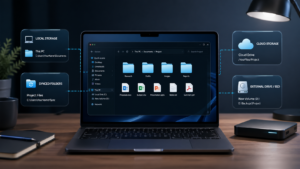
It also helps to understand that not every file is saved in the same place. Some files are stored locally on your computer, others may be synced with cloud services like OneDrive, and in many work environments files can also be stored in shared network folders. Understanding that difference makes file organization much easier.
You do not need to master all of that right away, but it is useful to know that “saved on the computer” does not always mean the same thing. In some cases, the file is stored directly on your device. In others, it may be connected to the cloud or to a company network, even if it looks like an ordinary folder on the screen.
That small habit alone can make your computer feel more organized and your work feel lighter.
A simple folder structure already helps a lot
You do not need a complex system to get started. In fact, simple is usually better.
A practical structure might include folders like these:
- Documents for notes, forms, contracts, and reports
- Projects for work separated by topic, client, or goal
- Downloads as a temporary place to review regularly
- Archive for older files you do not use often but still want to keep
Inside Projects, for example, you can create one folder for each project and then divide it further into things like received files, working files, and final versions.
The important part is not making it look impressive. The important part is making it easy to understand later.
Search becomes much more powerful when your files are organized
Even with a good folder system, there will be times when you just want to find something quickly.
That is where search becomes very useful. Modern operating systems let you search for files by name, and sometimes even by content. But search only works well when your files have meaningful names.
If a file is called final2.docx, it will be much harder to find. If it is called 2025-03-budget-proposal.docx, one good keyword is often enough.
This is one reason why naming matters so much. Clear names help both your folders and your search bar work for you instead of against you.
Do not forget about backup
Organization is important, but it is only part of the picture.
A file that is beautifully organized can still be lost if you only keep one copy of it. Computers fail. Accounts can have problems. Files can be deleted by mistake. That is why backups matter.
Important files should exist in more than one place. That could mean an external hard drive, a USB device, or a cloud service like Google Drive or OneDrive. You do not need a complicated backup system on day one, but you do need the habit of not trusting a single copy with everything important.
A well-known rule in IT is the 3-2-1 backup rule: keep three copies of your data, use two different types of storage, and keep one copy somewhere else, such as in the cloud. You do not need to apply it perfectly right away, but it is a very useful idea to keep in mind.
Why this matters more than people think
File organization may seem like a small skill, but it affects a lot of daily work.
It saves time. It reduces stress. It helps you avoid mistakes. It makes collaboration easier. And for anyone entering technology, administration, remote work, or digital content creation, it is one of those basic skills that quietly improves everything around it.
This is why it matters. Good organization is not about being overly strict or obsessive. It is about making your digital life easier.
Final thoughts
Files hold your information. Folders help you organize it. And the way you name and store things has a direct impact on how easily you can work later.
You do not need a perfect system. You just need one that is clear, practical, and easy to maintain.
Once that habit starts to become normal, everything else feels less messy.
In the next post, we will look more closely at where files are actually saved, including local storage, Desktop, OneDrive, and network folders.